
1. THE SHOCKING STAT (opening hook)
“Workers check their email between 11 and 36 times per hour.” (cloudHQ, 2025)
That number isn’t just an attention problem. For executives—whose value is concentrated in a handful of high-leverage decisions per week—it’s a profit problem.
Every check is a micro-switch. Every micro-switch pulls you out of strategy, out of judgment, out of deep work—and into triage.
11–36 checks per hour translates to checking email roughly every 1.7–5.5 minutes during active work time. (cloudHQ, 2025)
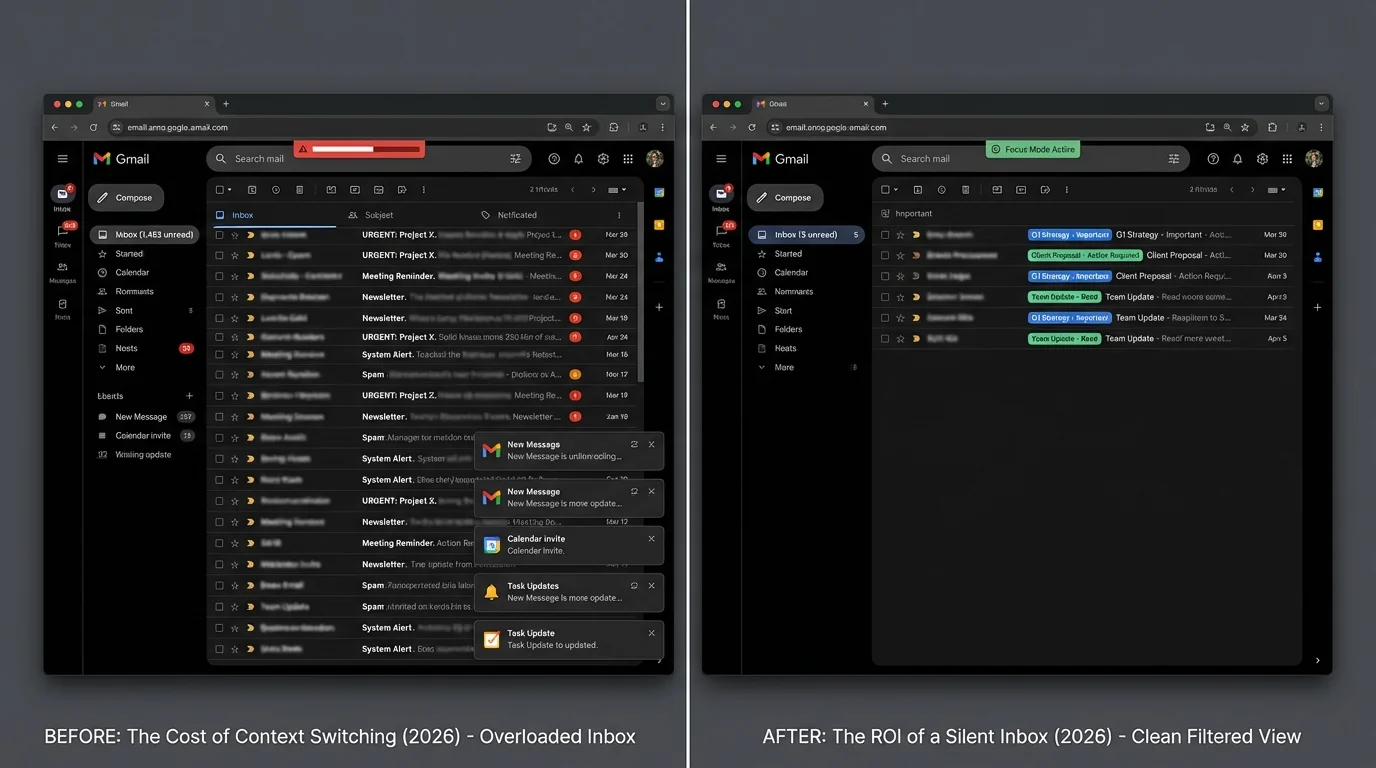
The “open inbox” era assumed anyone should be able to reach you, anytime. In 2026, that assumption has collided with three realities:
1) email volume keeps rising,
2) interruptions keep accelerating,
3) leadership work requires longer stretches of uninterrupted cognition than most roles.
The ROI of a “silent inbox” isn’t about being tidy. It’s about turning fragmented time back into compounding judgment.
2. HOW WE GOT HERE (trend section)
Email didn’t suddenly become worse. It became denser: more senders, more automation, more subscriptions, more internal routing, more “FYI,” and more machine-generated outreach.
The average professional now processes 179 emails daily—a 28% increase since 2019. (ZipDo, 2025)
That’s the macro trend. Now zoom in on what changed inside the workday.
2019 → 2026: the inbox became the workplace
2019: Email was the default coordination tool.
2020–2022: Remote work normalized “asynchronous everything.” Email volume didn’t just rise; it became the connective tissue between calendars, documents, approvals, vendors, and distributed teams.
2023–2026: Automation and templated outreach scaled. Subscriptions and notifications crept upward. Internal systems multiplied. And executives became the routing layer between every department’s priorities.
Knowledge workers spend up to 28% of their workweek on email—consistent with McKinsey’s finding of 13 hours per week spent clearing inboxes. (cloudHQ, 2025; McKinsey, Email Overload white paper)
If you’re an executive, 13 hours/week on email isn’t “communication.” It’s a reallocation of your most expensive resource: uninterrupted thinking time.
The hidden accelerant: interruption frequency
Microsoft’s Work Trend Index has been widely cited for the modern interruption pattern: work arrives as a steady stream of pings rather than batches.
Workers face a ping about every 2 minutes—around 275 interruptions per day. (Microsoft Work Trend Index via Speakwise, 2025)
Email is not the only ping. But email is the most socially coercive ping: it carries implied urgency, status dynamics, and response expectations.
Now combine these two trendlines:
- More messages (179/day, +28% since 2019)
- More checking (11–36 times per hour)
The result is predictable: leadership time becomes a sequence of partial attentions.
Contrast that tells the story: volume up, relevance not up
cloudHQ’s compilation highlights an uncomfortable mismatch: we check constantly, but much of what arrives doesn’t deserve executive attention.
Only 30% of emails need immediate action, and 32% may go unread—yet workers still check email 11–36 times per hour. (cloudHQ, 2025)
This is the signature failure of the open inbox: high-frequency review of low-relevance inputs.
And once the workday is shaped like that, the biggest cost is not minutes—it’s context.
3. THE REAL COST (data breakdown)
Executives experience email costs in three layers:
1) direct time lost to reading/replying,
2) context-switching penalties that multiply that time,
3) mental-health and cognitive load that degrade decision quality.
Time Cost
Let’s start with what’s easiest to measure: hours spent inside the inbox.
Knowledge workers spend 5 to 15.5 hours/week reading and responding to email. (cloudHQ, 2025)
McKinsey’s estimate sits near the middle:
Employees spend 13 hours/week clearing inboxes—about 28% of the workweek. (McKinsey, Email Overload white paper)
Annualizing the executive “inbox tax”
Assume a 50-week working year.
- 13 hours/week × 50 weeks = 650 hours/year
That is 16.25 forty-hour weeks.
Or said differently: over 4 months of full workweeks each year are spent on inbox clearing.
Even if an executive is “only” at 8 hours/week, that’s 400 hours/year (10 weeks). If they’re at the high end of 15.5 hours/week, that’s 775 hours/year (19+ weeks).
The time cost alone makes the silent inbox compelling.
But time is the small part.
Productivity Cost (the context-switching multiplier)
Email is not just a task. It’s a task that interrupts other tasks—and then taxes the restart.
Each email interruption can require about 23 minutes to fully regain focus. (Speakwise, 2025)
That “23 minutes” figure is widely echoed in popular productivity literature because it matches a real phenomenon: attention residue. Even when you switch back, part of your mind stays with the last thread.
A second stat captures the micro-mechanics of resumption:
Task resumption costs average 25.4 seconds per switch, while attention residue can degrade performance for up to 23 minutes. (Alibaba LifeTips via provided data)
These two numbers aren’t contradictory—they describe different levels:
- 25.4 seconds: the mechanical act of reorienting
- up to 23 minutes: the lingering performance degradation
Executives don’t just lose time. They lose quality of thinking inside time.
The “40% productivity drop” headline
Email overload can decrease productivity by up to 40% when accounting for time and context switching. (Speakwise, 2025)
Whether your organization experiences 10% or 40%, the direction is the same: the cost is nonlinear.
Email creates a fragmented day, and a fragmented day creates shallow work dominance—the executive becomes a high-paid router.
Dollar Cost (ROI model for a silent inbox)
Your raw sources don’t provide salary-based costs, so we’ll model transparently with assumptions.
Assumptions (edit these for your org)
- Executive fully loaded cost (salary + benefits + payroll taxes + overhead): $350/hour (illustrative)
- Email time (baseline): 13 hours/week (McKinsey)
- Work weeks/year: 50
- Conservative reclaimable time from a “silent inbox” approach: 30% of email time (not all email is waste)
Baseline cost of email time
- 13 hours/week × 50 = 650 hours/year
- 650 hours/year × $350/hour = $227,500/year per executive in email time
Conservative reclaim value from going silent
- 30% of 650 hours = 195 hours/year recovered
- 195 × $350 = $68,250/year per executive
That’s the time ROI before considering decision-quality ROI.
Now scale it.
- 10 executives: $682,500/year
- 25 executives: $1.7M/year
And this is conservative because:
- email time ranges up to 15.5 hours/week (cloudHQ)
- productivity drag can be much larger than time drag (up to 40%) (Speakwise)
The real executive ROI: fewer bad decisions
Executive leverage is not linear. One avoidable mistake in hiring, vendor selection, M&A diligence, security, PR, or product prioritization can dwarf the hourly model.
Context switching increases the probability of:
- misreading risk
- approving the wrong thing quickly
- deferring hard decisions
- responding emotionally
The “silent inbox” is best understood as a decision-quality investment with time savings as the measurable floor.
Mental Health Cost (and why it shows up in KPIs)
Your dataset doesn’t include a direct cortisol study link, so we’ll stay rigorous: we can’t claim a specific cortisol effect from your provided sources.
But we can quantify digital overload and burnout correlations.
64% of knowledge workers report digital overwhelm; 41% report stress and anxiety from notification overload; 12% took sick leave due to workplace technology. (ITPro, 2025)
The executive version of this is often hidden because leaders don’t take sick leave—they take it out on:
- sleep
- family time
- impulse decision-making
- shorter tempers and worse meetings
And the expectation layer matters:
71.1% feel expected to respond out-of-hours; 78.7% dread opening work email. (EmailToolTester, 2025)
That dread is not “soft.” It’s a leading indicator of avoidance, backlog growth, and eventually poorer responsiveness where it truly matters.
Deloitte’s framing is especially relevant for 2026:
Deloitte reports cognitive overload, fragmented systems, and context-switching are overtaking workload as leading burnout indicators. (Deloitte via HRD Connect, 2025)
This is the hinge: executives often try to solve overload by “working harder.” But 2026 burnout is increasingly about work fragmentation, not work volume.

4. THE SOLUTION (tie to KeepKnown)
Most inbox strategies are built on a flawed premise: the inbox should remain open, and technology should “figure it out.”
That leads to a methodology war:
- Bad method: probabilistic sorting (spam filters, AI sorting, blacklisting)
- Good method: deterministic screening (strict allow-listing, contact-first filtering)
Probabilistic tools guess what you meant. Executives don’t need guesses—they need guarantees.
Why algorithmic sorting fails executive ROI
Focused/Other tabs and AI sorting optimize for “average relevance.” Executive email isn’t average. It’s spiky: a small number of truly critical messages, surrounded by a large amount of distracting noise.
When the model guesses wrong, the cost isn’t just annoyance. It’s:
- a missed investor/customer/regulator message
- a delayed critical escalation
- a trust hit (“I emailed you twice”)
So executives keep checking—because they don’t trust the system.
High check frequency (11–36/hour) is often a symptom of low trust in filtering—not just low self-control. (cloudHQ, 2025)
The KeepKnown Protocol: invert the problem
KeepKnown’s approach matches the economics of executive attention:
- Don’t try to guess what’s bad.
- Only allow what’s known-good.
Mechanically, KeepKnown is an API-based email filter (server-level, not a plugin) that moves non-contacts to a KK:OUTSIDERS label/folder.
That matters because it changes the executive’s default experience from:
- “everything can interrupt me”
to
- “only known senders can interrupt me.”
This is deterministic vs probabilistic filtering in practice (see: Deterministic vs Probabilistic Email Filtering for Executives).
How strict allowlisting attacks each cost category
1) Time cost: fewer messages in the primary inbox
If only contacts land in the main inbox, the executive’s scanning load drops immediately. That targets the 5–15.5 hours/week directly (cloudHQ, 2025).
2) Context-switching cost: fewer interruptions
A silent inbox doesn’t just remove reading time; it reduces the number of “should I open this?” decisions.
That’s decisive because even irrelevant emails trigger a context switch: you still read the subject line, assess urgency, and emotionally tag it.
With fewer triggers, you reclaim the deep-work blocks that context switching destroys.
3) Mental load: less dread, less out-of-hours compulsion
When the inbox is quiet by default, you don’t feel hunted by unknown senders. That directly counters the dread/expectation pattern (EmailToolTester, 2025) and the overwhelm/sick leave linkage (ITPro, 2025).
Security ROI (the silent inbox’s underpriced benefit)
Executives are spear-phishing targets. An open inbox expands attack surface because unknown senders can reach you directly—and urgency can override skepticism.
Strict allowlisting shrinks exposure by default: unknown senders are routed away from the primary attention stream.
If you’re on Microsoft 365, this also ties into executive security hardening (see: How to Harden Microsoft 365 Security for Executives).
Why this is operationally realistic in 2026
A silent inbox fails if it requires constant manual upkeep.
KeepKnown’s model uses what’s already maintained: your contact graph.
- Known people: flow normally
- Unknown people: diverted to KK:OUTSIDERS
And because it’s OAuth2 verified with CASA Tier 2 and uses encrypted hashes (no plaintext storage), it’s designed for executive-grade environments.
If you want the short version: strict allowlisting makes the inbox predictable again.
To implement: https://keepknown.com
For the deeper philosophy shift—from “Inbox Zero” to screening—see: Inbox Fortress Replaces Inbox Zero For Founders.
5. WHAT HAPPENS NEXT (future outlook)
If 2019–2026 was the era of email expansion, 2026–2029 looks like the era of attention scarcity pricing.
Here’s the forward bet supported by your trend data:
If nothing changes
- Email volume keeps compounding (+28% since 2019 already) (ZipDo, 2025)
- Checking frequency stays high (11–36/hour) (cloudHQ, 2025)
- Interruptions remain constant (ping every ~2 minutes) (Microsoft WTI via Speakwise, 2025)
The likely outcome isn’t just “busy executives.” It’s:
- slower strategic execution (less deep work)
- higher burnout risk driven by fragmentation (Deloitte via HRD Connect, 2025)
- worsening reliance on algorithmic triage that executives don’t trust
If organizations intervene with a silent inbox standard
A strict allow-listing posture creates a structural change:
- primary inbox becomes a high-signal channel
- outsiders are batched and reviewed intentionally
- executives regain long blocks of focus (the rarest resource in modern work)
The ROI shows up in three measurable places:
1) reclaimed hours (hard ROI)
2) fewer late-night email loops (wellbeing ROI)
3) fewer “oops” decisions made under interruption (strategic ROI)
Email is now both 28% of the workweek (McKinsey) and a major driver of interruption patterns that can cut productivity by up to 40% (Speakwise). The only scalable fix is to reduce inbound triggers—not get better at enduring them.
Executive takeaway: stop sorting, start screening
In 2026, the winning move isn’t inbox organization. It’s inbox access control.
- Sorting assumes the inbox must stay open.
- Screening assumes your attention is an asset to protect.
The silent inbox is not a lifestyle tweak. It’s an operating model.
Strict allowlisting—implemented as contact-first filtering—turns the open inbox from a default into an exception.
And that’s what ROI looks like when your scarcest resource is not time.
It’s uninterrupted judgment.