
1. The problem
Executives don’t have an “email problem.” They have a high-stakes routing problem under constant adversarial pressure.
At 300–800 inbound messages/day, even a “good” filter with a 1% false-positive rate is not good enough. If 500 emails/day are processed and 1% are wrongly hidden, that’s 5 legitimate emails missed per day—about 25/week. For an executive inbox, “missed” doesn’t mean “inconvenient.” It can mean missed investor replies, legal notices, customer escalations, or board scheduling.
The other side is equally expensive: if junk and unsolicited mail still lands in the main inbox, the cost shows up as decision fatigue (constant micro-decisions), context switching, and “notification anxiety” (your brain learns that pings are mostly noise, but still demands attention). The result: executives either ignore email (and miss real items) or over-check (and burn time).
The key question isn’t “which app is best,” it’s: Which methodology remains stable as volume and threats scale?
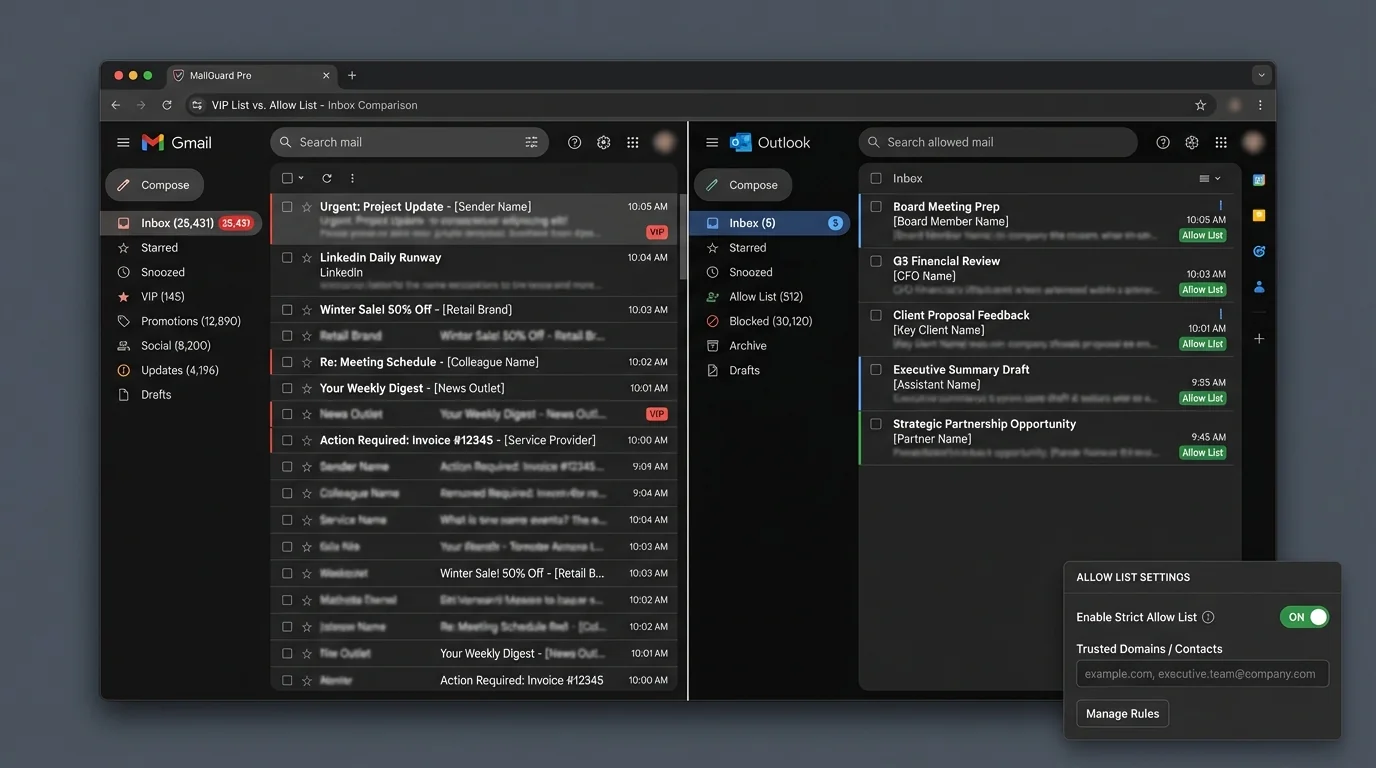
2. Methodology breakdown
Below are four common approaches that get described as “VIP list” or “allow list” solutions, plus the surrounding ecosystem they usually rely on.
VIP list method
How it works: You define a set of “VIP” senders (or domains). Messages from VIPs get priority treatment (e.g., bypass sorting, hit the primary inbox, trigger alerts).
Where it shines:
- Fast relief: immediately reduces anxiety by ensuring “important people” surface.
- Low initial setup: add a handful of names and you feel the impact.
- Compatible with open inbox: you can keep receiving everyone else, just deprioritized.
Where it fails:
- It solves priority, not access. Non-VIPs still reach the inbox surface area somewhere, so triage still exists.
- VIP bloat over time: as assistants and teams add “just one more vendor,” the VIP set becomes an “everything-business-like” exception list.
- VIP impersonation risk: VIP treatment can accidentally become a bypass lane if identity checks are weak.
“Allowlists balloon to hundreds of domains… described as ‘an open door’ when unchecked expansion occurs.” (security practitioner feedback summarized from forums)
Engineering verdict: VIP lists are a QoS mechanism, not a security boundary. Architecturally, they don’t reduce inbound complexity; they just create a fast lane. As volume grows, the system still has to classify, notify, and present the remaining majority—meaning triage cost scales with inbound volume.
VIP lists often become a hidden “bypass policy.” Without governance (who can add, what proof is required, how often reviewed), they drift toward permissive.
Strict allow list method
How it works: Only messages from known-good identities are allowed into the primary inbox flow. Everything else is deterministically routed away (held, labeled, or placed into an “outsiders” queue). This is inversion: don’t guess what’s bad; only admit what’s good.
Where it shines:
- Deterministic behavior: predictable outcomes beat probabilistic guessing for executive workflows.
- Triage collapse: the default state becomes “quiet,” and review becomes intentional.
- Stronger phishing posture: fewer unknowns touch the primary inbox, reducing exposure to spear-phishing and social engineering.
- Scales with volume: as inbound increases, the primary inbox stays stable because admission is bounded by the allow list.
Where it fails:
- Cold-start friction: first-time legitimate senders need a path to become known (introductions, approvals, forms, assistants).
- Business development edge cases: executives who rely on inbound cold email need a separate intake channel.
Engineering verdict: Strict allowlisting is a policy boundary and a scaling strategy. It transforms the inbox from an “open queue” to a controlled interface. That’s why it scales: the default path is deny/hold, so noise growth does not linearly increase cognitive load.
Strict allowlisting works best when “known” is defined by durable identity signals (contacts + authenticated sender identity), not just a display name.
Manual rule-based sorting
How it works: Hand-built filters (sender, subject keywords, regex patterns, list rules) route mail into folders/labels.
Where it shines:
- Transparency: you can explain why a message moved.
- Precision for stable patterns: receipts, calendar noise, internal alerts.
Where it fails:
- Fragility: rules break when senders change domains, vendors rotate subdomains, or formats shift.
- Rule conflicts: precedence issues and brittle regex can cause unexpected routing.
“Broke when sender changed domain.” (common admin complaint)
“One misconfigured regex rule rerouted all incoming mail.” (catastrophic configuration failure report)
Engineering verdict: Manual rules don’t scale because they create a configuration surface area that grows with the organization. Beyond a certain threshold, you’re not “filtering email,” you’re maintaining a mini software system—without tests, code review, or safe deployment.
If you can’t stage, test, and roll back rule changes, you have production risk. Email is production.
AI or behaviorally adaptive sorting
How it works: A model predicts priority based on historical behavior (opens, replies, sender frequency, content signals). It then sorts into “important” vs “other.”
Where it shines:
- Reduces some manual sorting and rule churn.
- Can adapt to changing patterns without explicit configuration.
- Users report meaningful time savings in triage when it works (e.g., hours down to minutes in some anecdotes).
Where it fails:
- Trust problem: executives must believe “important will not be missed.”
- False positives are expensive: one missed board email erases weeks of productivity gains.
- Opacity: hard to audit why something was buried.
- Privacy/compliance: behavioral systems often need broad access to content/metadata.
“Missed important email… had to check spam daily.” (assistant feedback summarized from executive inbox threads)
Engineering verdict: AI sorting is probabilistic triage. That’s useful for consumer-grade overload, but for executives it introduces operational risk: you must continuously verify the model didn’t drift. If the system requires daily checking of the “other” pile, it didn’t eliminate triage—it just moved it.
A model that’s 99% accurate still fails often at executive volume. At 500 emails/day, 1% error is 5 mistakes/day.
3. Comparison table
| Methodology | False Positives (missed legit) | Time Cost (triage) | Maintenance | Security |
|---|---|---|---|---|
| VIP list method | Medium (non-VIP can still be mis-sorted/overlooked) | Medium-High (inbox still open; VIP just prioritized) | Medium (VIP sprawl, exceptions) | Medium (VIP bypass risk if spoofing/auth isn’t enforced) |
| Strict allow list method | Low in main inbox (deterministic); shifts to controlled review queue | Low (primary inbox stays small) | Medium (governance + onboarding) | High (shrinks attack surface; strongest posture when paired with SPF/DKIM/DMARC) |
| Manual rules | Medium-High (rule conflicts, brittle patterns) | Medium (works until it doesn’t; then expensive) | High (rule sprawl; constant tuning) | Medium (can block known patterns, but fragile) |
| AI/adaptive sorting | Medium (depends on model + drift) | Medium-Low (when accurate) | Medium (monitoring + retraining/oversight) | Medium (helps detect anomalies but adds opacity + privacy concerns) |
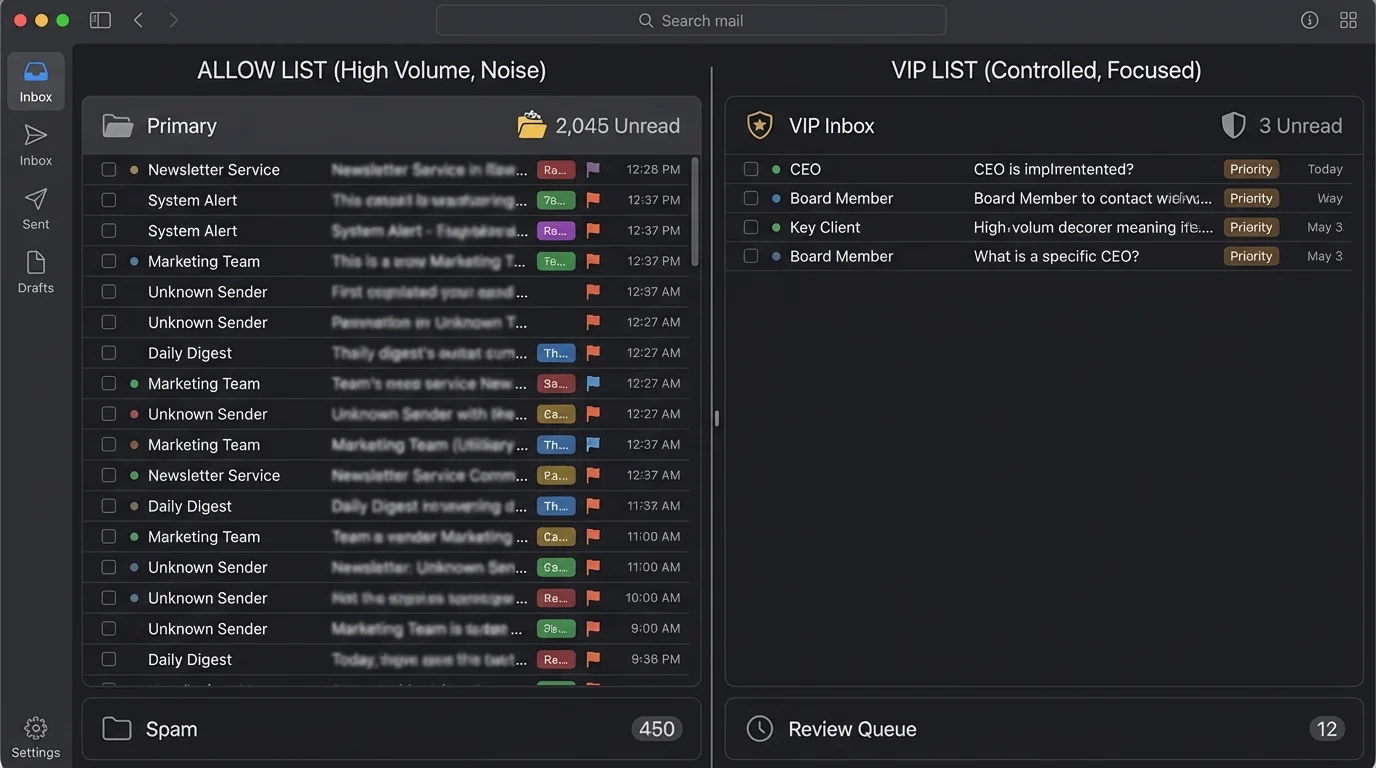
4. The winner: strict allowlisting
The architectural reason strict allowlisting wins for high-volume executives is simple:
It is deterministic under scale
Most inbox systems try to decide which messages are “bad.” That is an unbounded classification task: adversaries can generate infinite variants (new domains, new phrasing, new infrastructure). In contrast, strict allowlisting decides what is “good,” which is bounded by the executive’s real relationship graph.
In engineering terms:
- Blacklisting / AI sorting: complexity grows with attacker creativity and inbound volume.
- Strict allowlisting: complexity grows with your actual network of trusted correspondents—which grows far more slowly.
It collapses triage cost instead of optimizing it
VIP lists and AI sorting are optimization strategies: “surface what matters.” Strict allowlisting is a redesign: “only admit what is known.” That removes an entire class of work: deleting, skimming, second-guessing.
This is why “Open Inbox” fails as a concept: it assumes strangers deserve a first-class interrupt channel to the highest-leverage person in the company. In 2026 threat and volume conditions, that’s structurally outdated.
It improves security by shrinking the exposure window
Phishing succeeds when it reaches the executive’s attention. Allowlisting reduces the probability that novel phishing even touches the main inbox. But there’s a crucial nuance:
- Allowlisting is strongest when paired with sender authentication enforcement (SPF/DKIM/DMARC).
- Research shows misconfigurations are common and overly permissive SPF is widespread, weakening identity guarantees (e.g., reported error rates and broad allowances in recent measurement work).
So the winning architecture is:
1. Strict contact-first admission (deterministic)
2. Authentication checks (identity integrity)
3. A controlled outsiders queue (safe intake)
How KeepKnown fits (without relying on “magic sorting”)
KeepKnown implements the strict allowlisting methodology as an API-level email filter (server-side behavior, not a client plugin). It routes non-contacts into a dedicated label/folder (e.g., KK:OUTSIDERS) so the executive’s primary inbox remains quiet while outsiders are reviewed intentionally.
It’s designed around security fundamentals (OAuth2, verified vendor posture, and hashed storage rather than plaintext). If you’re evaluating vendor risk, the relevant engineering question is: does the system reduce access by default, and can it do so without expanding your data exposure surface? For that side of the decision, see CASA Tier 2 For Email Vendors.
For deeper reasoning on why deterministic gating beats probabilistic guessing, see Deterministic vs Probabilistic Email Filtering for Executives.
And if your environment is Microsoft-based, pair this approach with security hardening guidance (identity, conditional access, admin controls): How to Harden Microsoft 365 Security for Executives.
5. When other methods still make sense
Strict allowlisting is not a universal hammer. It’s the best default for high-volume executives, but other methods have legitimate niches.
VIP lists are fine when the inbox is still intentionally open
Use VIP lists when:
- The exec’s role depends on inbound cold email (media, partnerships, recruiting).
- You can tolerate noise but want priority highlighting.
- The org is early-stage and relationship graphs shift daily.
Trade-off math: VIP lists reduce the chance of missing messages from a few key people, but they do not bound the inbox. Your cognitive load still scales with inbound.
Manual rules are great for “machine mail”
Use manual rules for:
- Receipts, ticketing notifications, calendar floods.
- Stable system senders where identity is predictable.
But treat rule changes like code:
- staged changes
- review/approval
- rollback plan
AI sorting is useful as a secondary lens, not the gate
AI can be helpful when:
- You’re using it to rank within an already-controlled inbox.
- Compliance allows behavioral analysis.
- You have staff discipline to audit the “other” bucket.
In executive environments, the safe pattern is: use AI for prioritization, not admission control.
If a system requires you to check the “filtered” bucket daily “just in case,” you still own the same interruption cost—just with extra steps.
6. Verdict
For high-volume executives, the VIP list method is a priority overlay on top of an open inbox. It helps quickly, but it doesn’t scale because it doesn’t change the underlying shape of the problem: unbounded inbound.
The strict allow list method scales because it is architecturally different: it replaces probabilistic guessing and endless exceptions with deterministic admission control. When paired with authentication enforcement and a governed outsiders queue, it minimizes false positives in the primary inbox, reduces triage time, and shrinks the phishing attack surface.
If you want the “open inbox” era to end operationally—not just cosmetically—use a strict allowlisting implementation such as KeepKnown (API-level contact-first filtering) to route outsiders into a controlled queue while your real inbox stays for known-good senders.