Cold outreach in Gmail
How to block cold emails in Gmail when the spam filter lets them in.
Cold emails reach the inbox because they look like normal mail: sent one at a time, from a real domain that passes SPF, DKIM, and DMARC. Block repeat senders, filter follow-up phrases into a label, and give public pages their own address. To stop the whole category, screen every sender who isn't in your contacts.
Last updated
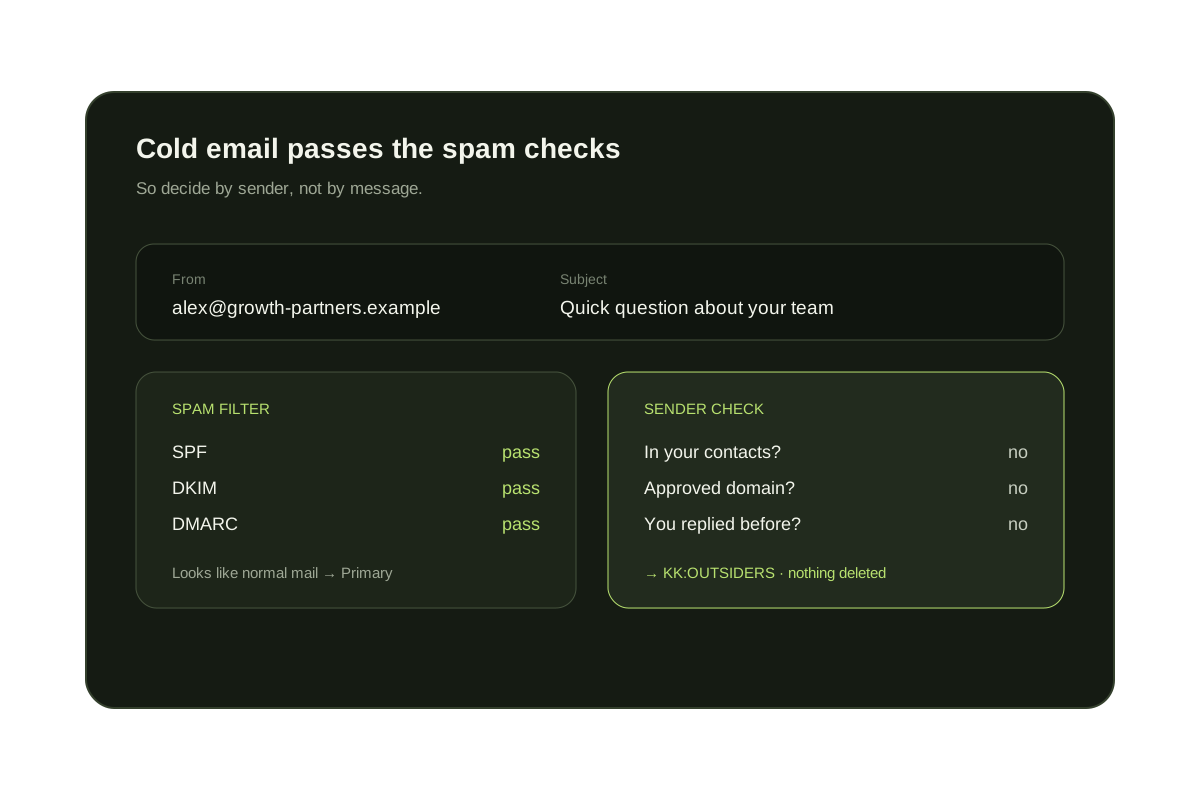
Gmail's spam filter is built for junk, phishing, and bulk mail. A personalized pitch from a real company is none of those. Outreach tools send small batches from authenticated domains and write each message to look like a one-to-one email, so it usually lands in Primary.
Google's bulk-sender requirements, including one-click unsubscribe, apply to senders that send around 5,000 or more messages a day to Gmail accounts. Cold outreach is usually spread across smaller sending inboxes, so those rules rarely help. The steps below use Gmail's own tools first, then show where contact-based screening fits.
Short answer
Spam filters judge messages. Cold email is a sender problem.
Gmail can't tell a first-time pitch from a first-time client by the text alone. The dependable fix is to decide by sender: people you know reach the inbox, and everyone else waits in a label you check when you choose.
Native Gmail steps that reduce cold email
- Block repeat senders: open the message, select More, then Block. Use Report spam for outreach you never agreed to.
- Use the unsubscribe link when a recognizable company includes one. Replying to unknown senders confirms that your address is read.
- Create a filter with Has the words set to {"just following up" "circling back" "quick call" "15 minutes"} and the actions Skip the Inbox and Apply the label Possible outreach.
- Put a separate address on your website, such as you+site@gmail.com, and filter to:you+site@gmail.com into its own label.
- Filter domains that keep coming back with from:example.com, but expect outreach tools to switch to new lookalike domains.
What each fix stops, and what it misses
| Fix | Stops | Misses |
|---|---|---|
| Block sender | One address that keeps writing | The next sender and rotated addresses |
| Report spam | Helps Gmail learn about that message | Personalized emails that look like normal mail |
| Phrase filter | Sequences that reuse stock phrases | New wording; can catch real replies, so label instead of deleting |
| Separate public address | Outreach scraped from your website | Senders who guess or buy your main address |
| Contact-based screening | Every sender you don't already know | Nothing is lost: new senders wait in a review label |
Why cold email gets past Gmail
Real, authenticated domains
Outreach is usually sent from domains with valid SPF, DKIM, and DMARC, so authentication checks pass.
Low volume per sending inbox
Messages are spread across many small inboxes instead of one bulk sender that spam systems can spot.
Personal-looking text
Your name, company, and a specific question make each message read like a normal one-to-one email.
Decide by sender
Send every unknown sender to a review label.
KeepKnown keeps contacts, VIP domains, and people you have replied to in the inbox. Cold outreach waits in KK:OUTSIDERS, and nothing is deleted.
The audit counts unknown senders without changing your inbox.
Questions before you connect.
How do I block cold emails in Gmail?
Block repeat senders, filter common follow-up phrases into a label, and use a separate address on public pages. To catch every cold email, screen senders who are not in your contacts with a tool such as KeepKnown.
Why do cold emails go to my inbox instead of spam?
Most are sent in small batches from real, authenticated domains with personalized text, so Gmail treats them like normal mail.
Should I reply to cold emails asking to be removed?
Use an unsubscribe link from a company you recognize. For unknown senders, replying confirms your address is active, so blocking or screening is usually better.
Will screening hide a real first-time customer?
With KeepKnown the message is not blocked or deleted. It waits in KK:OUTSIDERS, and once you approve the sender they reach the inbox next time.
Does KeepKnown read my emails to detect cold outreach?
No. Screening uses the sender and your contacts, not the message text.
Cold outreach
Contacts reach the inbox. Cold outreach waits for review.