Gmail unknown senders
Block emails from unknown senders in Gmail without losing real mail.
Gmail has no setting that blocks everyone you don't know. Block sender works one address at a time and sends mail to Spam, where Gmail deletes it after 30 days. To hold back all unknown senders, use an allow-list filter you maintain, or a contact-based screener that moves strangers to a review label.
Last updated
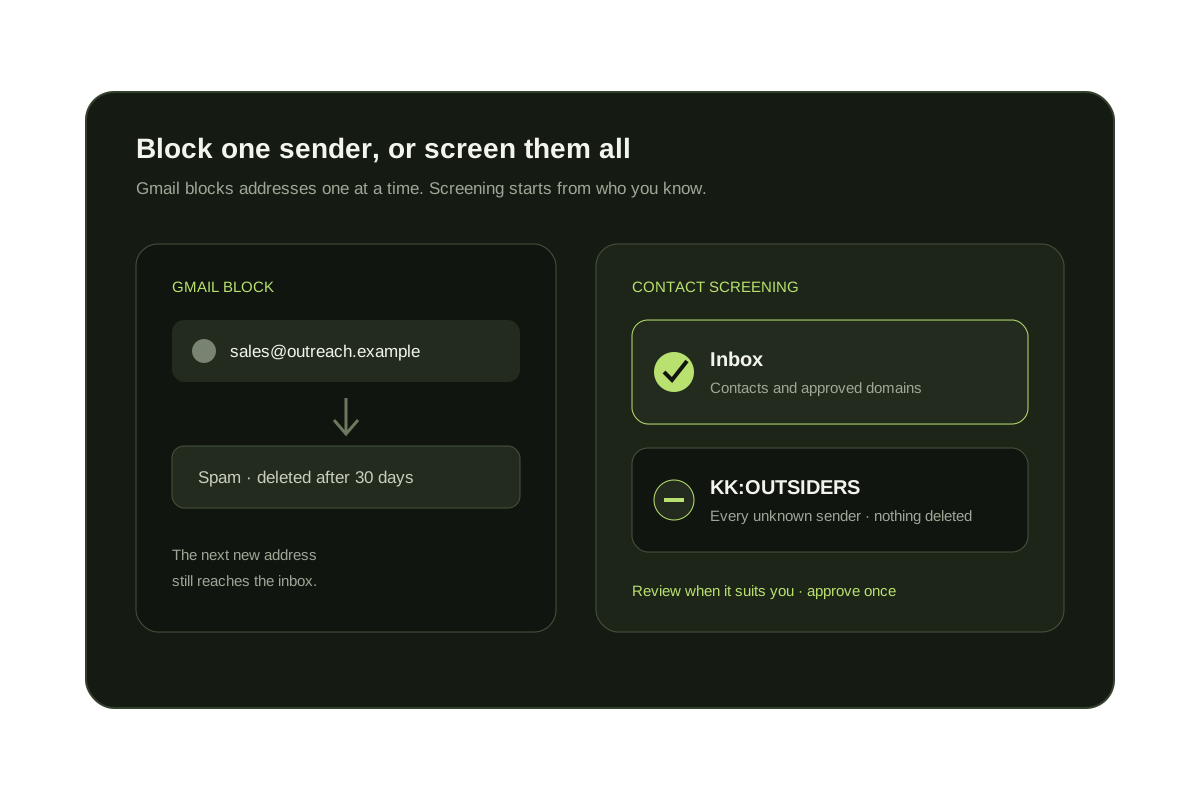
Gmail's Block action applies to one email address. Blocked mail goes to Spam, the sender is not told, and Gmail removes Spam messages after 30 days. That is the right tool for one persistent sender, not for everyone you have never met.
To hold back every unknown sender you need a rule based on who you already know. Gmail's filters can do a version of this if you list trusted addresses yourself. KeepKnown does it from Google Contacts and moves the rest to a label you can review.
Short answer
You can block one sender, not all strangers.
Use Block for a specific address that keeps writing. For every sender who isn't in your contacts, use a filter that excludes your trusted addresses, or a screener such as KeepKnown that checks Google Contacts for you.
Block one sender in Gmail
- Open a message from the sender.
- Select More (the three dots) at the top right of the message.
- Select Block, then confirm. Future messages from that address go to Spam.
- To undo it, open Settings, select See all settings, then Filters and Blocked Addresses, and unblock the address.
Hold back every sender who is not on your list
- Select Show search options in the Gmail search bar.
- In Has the words, type -from:alice@example.com -from:yourcompany.com, adding one -from: entry for each person or domain you trust.
- Select Search to preview the mail the rule would hold back.
- Select Create filter, choose Skip the Inbox (Archive it) and Apply the label, and name the label Unknown senders.
- Update the filter whenever you add a new contact.
Four ways to block unknown senders in Gmail
| Method | What it blocks | Where the mail goes | Limit |
|---|---|---|---|
| Block sender | One address | Spam, deleted after 30 days | Only after they email you; senders can switch addresses |
| Allow-list filter | Anyone not on your typed list | A label, out of the inbox | Manual list that does not read Google Contacts |
| Workspace admin rules | Senders outside approved lists, across the organization | Quarantine or another routing action | Admins only; not available for personal Gmail |
| KeepKnown | Anyone not in contacts, VIP domains, or people you have replied to | KK:OUTSIDERS label, nothing deleted | Paid plan from $12.99/month; connects with Google authorization |
Keep strangers recoverable
Hold back unknown senders instead of blocking them.
KeepKnown moves senders who are not in your contacts to KK:OUTSIDERS, so a first-time client or receipt is still one click away.
The audit is free and does not change your inbox.
Questions before you connect.
Can I block all unknown senders in Gmail?
Not with one setting. Gmail blocks individual addresses. To hold back everyone else, create a filter that excludes your trusted addresses or use a contact-based screener.
What happens to email from a blocked sender in Gmail?
It goes to Spam and the sender is not notified. Gmail deletes messages that have been in Spam for more than 30 days.
Can I block unknown senders from the Gmail app on my phone?
The Gmail app can block individual senders, but filters are created in Gmail on a computer. Once a filter or KeepKnown is active, it also applies to mail you read on your phone.
Is blocking unknown senders risky for important first emails?
Blocking hides them in Spam. A label-based rule is safer, because a first-time client, recruiter, or receipt stays easy to find.
Doesn't Gmail's spam filter already block unknown senders?
No. Spam filtering judges whether a message looks like spam. A polite email from a real stranger usually passes and lands in your inbox.
Gmail unknown senders
Hold back strangers without blocking or deleting their mail.