Founder and executive inbox
How founders and executives can stop cold outreach reaching the inbox.
A founder or executive address is easy to find and valuable to sellers, so sales, vendor and fundraising outreach arrives daily. Gmail and Outlook can block, filter and delegate, but outreach tools rotate domains. Holding every sender outside your contacts in a review label, or for an assistant to triage, keeps the inbox for customers, team and investors.
Last updated
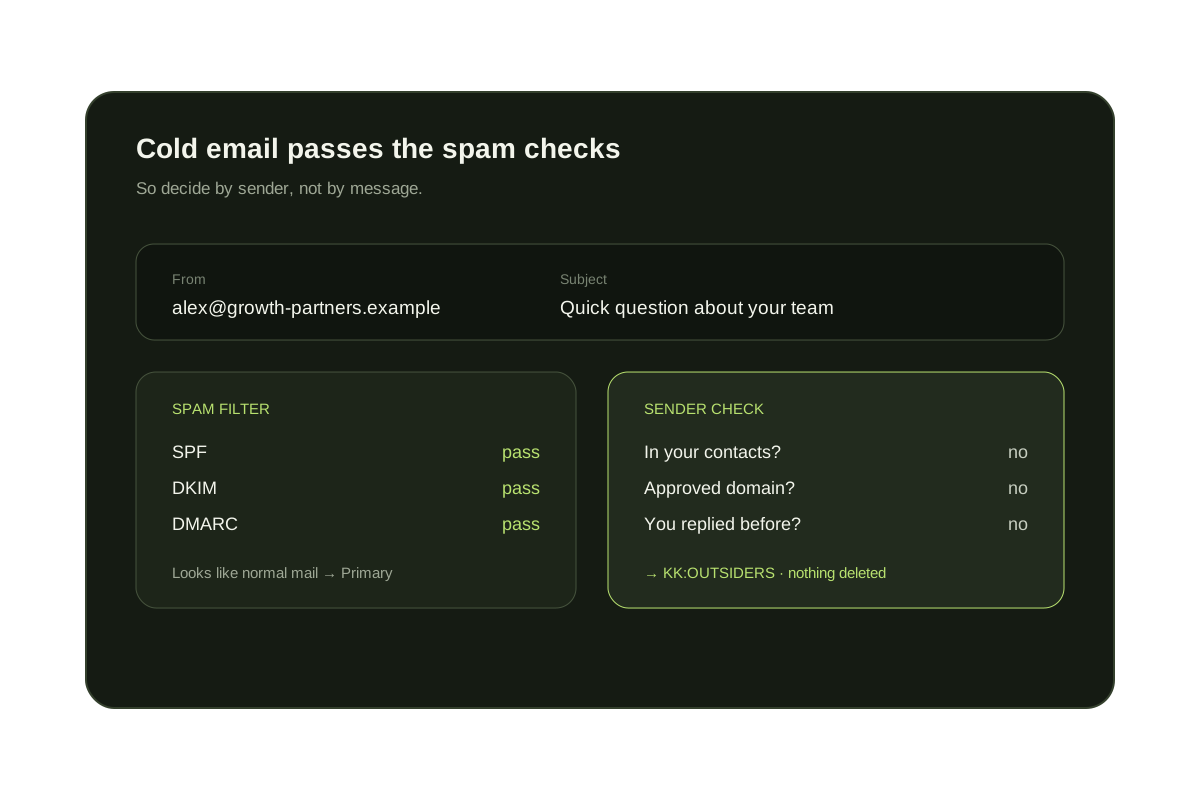
Senior people receive more outreach because the title is public. Some of it matters: a customer, a candidate, an investor you have not met. The aim is to separate known people from everyone else rather than to judge each message by its wording. See also how to block cold emails in Gmail.
Short answer
Decide by who is writing, then review the rest on a schedule.
Keyword filters and blocks chase outreach that keeps changing. Treating people in your contacts, customers' domains and past replies as the inbox, and holding everyone else in a label that you or an assistant review, scales better as your public profile grows. Nothing needs to be deleted.
Native Gmail and Outlook options
- Block and report repeat senders. In Gmail choose More then Block, or Report spam for outreach you never agreed to. In Outlook use Blocked senders.
- Filter follow-up phrases such as {"just following up" "circling back" "quick call"} into a label named Outreach. Outlook rules can move the same words to a folder.
- Use a public address for your website and press page, such as you+site@yourdomain.com in Gmail, and filter it to a label.
- Give an assistant delegate access so they can triage a label or folder for you. Gmail and Outlook both offer delegate access, and a delegate can read your mail, so grant it deliberately.
- Add customers, investors and your team as contacts and approve their domains so rules and screening recognize them.
What each approach handles
| Option | What it handles | Where it falls short |
|---|---|---|
| Block and report | A repeat sender | Rotated addresses and new lookalike domains |
| Phrase filter | Stock follow-up wording | New wording; may catch a real reply, so label instead of delete |
| Public contact address | Outreach scraped from your site | Senders who guess or buy your main address |
| Delegate triage | Moves the reading work to a person | Gives someone access to your mail and still shows them everything |
| Contact-based screening (KeepKnown) | Every sender not in your contacts, VIP domains or past replies | A new customer or investor waits until the label is reviewed |
Where KeepKnown helps, and where it does not
A review label, not a bin
Unknown senders move to KK:OUTSIDERS (Gmail) or an Outlook category. You or an assistant can review it, and nothing is deleted.
Approve customers and investors once
Approve a sender or add their company as a VIP domain and later messages reach the inbox.
Limits to know
A first message from a new customer is not in the inbox until the label is reviewed, so check it on a schedule that suits your work. KeepKnown screens senders; it does not write replies or manage your calendar.
Decide by sender
Keep the inbox for people you already know.
KeepKnown sends contacts, VIP domains and people you have replied to to the inbox. Cold outreach waits in KK:OUTSIDERS, and nothing is deleted.
The audit counts unknown senders without changing your inbox.
Questions before you connect.
How can a founder stop cold emails?
Block repeat senders, filter follow-up phrases into a label, use a separate public address and screen senders who are not in your contacts. The last step is the one that catches new senders.
Why do executives get so much cold outreach?
Titles and addresses are public and sales tools build lists from them, so the same address receives messages from many senders.
Will I miss a real investor or customer?
Their first message waits in the review label rather than being deleted. Review it regularly and approve the sender so later mail arrives in the inbox.
Can an assistant review the label for me?
Gmail and Outlook support delegate access, which lets an assistant open your mailbox, including the label. Delegates can read all your mail, so grant it carefully.
Does KeepKnown read my messages?
No. Screening uses the sender and your contacts, not message bodies. The privacy page covers what is read, stored and sent to third parties.
Does it support Google Workspace and Microsoft 365?
Yes. KeepKnown works with Gmail, Google Workspace, Outlook.com and Microsoft 365. Work and school Microsoft accounts may need admin consent.
Founder inbox
Customers and team reach the inbox. Cold outreach waits.