Recruiter email
How to stop recruiter emails in Gmail without missing a real offer.
Recruiter outreach is real mail from real people, so Gmail's spam filter leaves it in the inbox. You can block repeat senders and filter common phrases, but new recruiters keep arriving. A contact-based screener holds every unknown recruiter in a review label instead, and you approve the ones worth answering.
Last updated
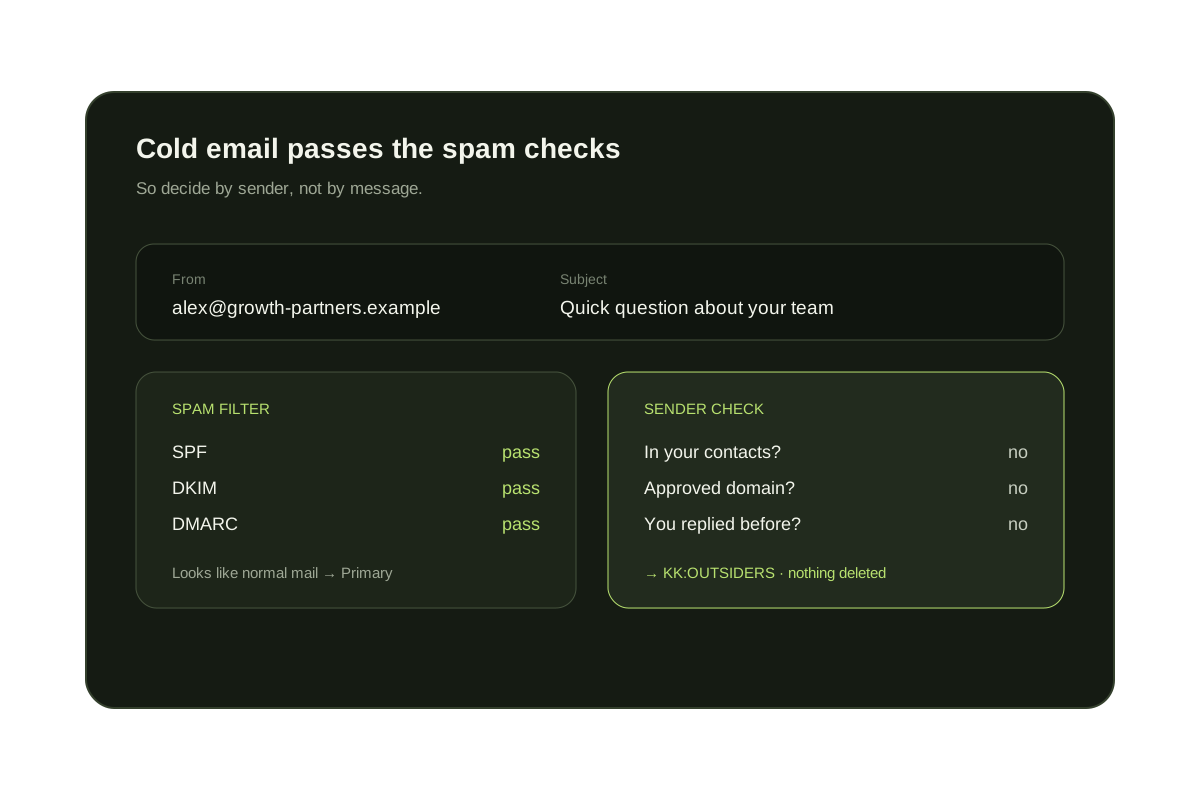
Recruiter messages are a mix of useful and unwanted: a role that fits next to a template sent to hundreds of people. Because they are personal looking and sent by real people, spam filters rarely catch them. The steps below start with Gmail and Outlook's own tools. KeepKnown's privacy page explains what it reads before you connect anything.
Short answer
Recruiters are a sender problem, not a spam problem.
Gmail and Outlook can block one address or filter a phrase, but a new recruiter, agency or sourcing tool arrives from a new address every time. Screening by sender, so people you know reach the inbox and everyone else waits in a label, stops the category without hiding the offers you want.
What you can do with Gmail and Outlook alone
- Block recruiters who keep writing: in Gmail open the message, choose More, then Block. In Outlook, add the address to Blocked senders.
- Use the unsubscribe link when the message comes from a job platform or agency newsletter. Replying to a one-off recruiter only confirms the address is read.
- Create a Gmail filter with Has the words set to {"your background" "exciting opportunity" "open to new roles" "hiring for"} and the actions Skip the Inbox and Apply the label Recruiters. In Outlook, create a rule on the same words that moves mail to a folder.
- Say it in your public profiles. If a job site or profile has a setting for whether you are open to recruiter contact, turn it off or adjust it there.
- If you want recruiters from specific companies, filter those domains into the inbox and treat the label as your review queue.
What each approach stops, and what it misses
| Option | What it handles | Where it falls short |
|---|---|---|
| Block sender | One address that keeps writing | The next recruiter, agency or sourcing tool |
| Phrase filter | Template wording such as 'exciting opportunity' | New wording; can catch real offers, so label instead of delete |
| Profile or platform settings | Contact that starts from that platform | Email found elsewhere or sent from a different tool |
| Contact-based screening (KeepKnown) | Every sender not in your contacts, VIP domains or past replies | A real recruiter waits until you review the label |
Where KeepKnown helps, and where it does not
Recruiters wait in KK:OUTSIDERS
Unknown senders move to a label (Gmail) or category (Outlook). Nothing is deleted or bounced, so you can check the label when you choose.
Approve the ones worth a reply
Once you approve a sender, or add their company as a VIP domain, their mail reaches the inbox next time.
Limits to know
If you are actively job hunting, a recruiter's first message is not in the inbox until you check the label. KeepKnown is a paid plan and works with Gmail and Outlook only.
Decide by sender
Review recruiters on your schedule instead of in your inbox.
KeepKnown keeps contacts, VIP domains and people you have replied to in the inbox. Recruiters you have not met wait in KK:OUTSIDERS, and nothing is deleted.
The audit counts unknown senders without changing your inbox.
Questions before you connect.
How do I stop recruiter emails in Gmail?
Block repeat senders, filter template phrases into a label, and turn off recruiter contact on the profile sites where you are listed. To catch every new recruiter, screen senders who are not in your contacts with a tool such as KeepKnown.
Why do recruiter emails land in my inbox and not spam?
They are sent by real people or tools from real domains and read like personal messages, so Gmail treats them as normal mail.
Can I still hear from recruiters I want?
Yes. Add their address or company domain to your approved senders, or approve them from the review label, and their mail reaches the inbox.
Should I reply 'not interested' to stop them?
A short reply to a person you know can be polite. For unknown senders it confirms your address is read, so blocking or screening is usually better.
Does KeepKnown read the recruiter's message?
No. Screening uses the sender and your contacts, not the message body. The privacy page lists what is read and stored.
Does this work in Outlook?
Yes. KeepKnown works with Outlook.com and Microsoft 365 using a category instead of a Gmail label.
Recruiter email
Known people reach the inbox. Recruiters wait for review.