PR pitch overload
How to stop PR pitch emails from burying the tips you want.
Press pitches arrive from agencies and mass-mail tools that look like normal mail, so spam filters let them through. Blocking addresses and filtering phrases helps a little, and new pitches keep coming. Screening unknown senders into a review label keeps the inbox for sources and colleagues and lets you skim pitches when you choose.
Last updated
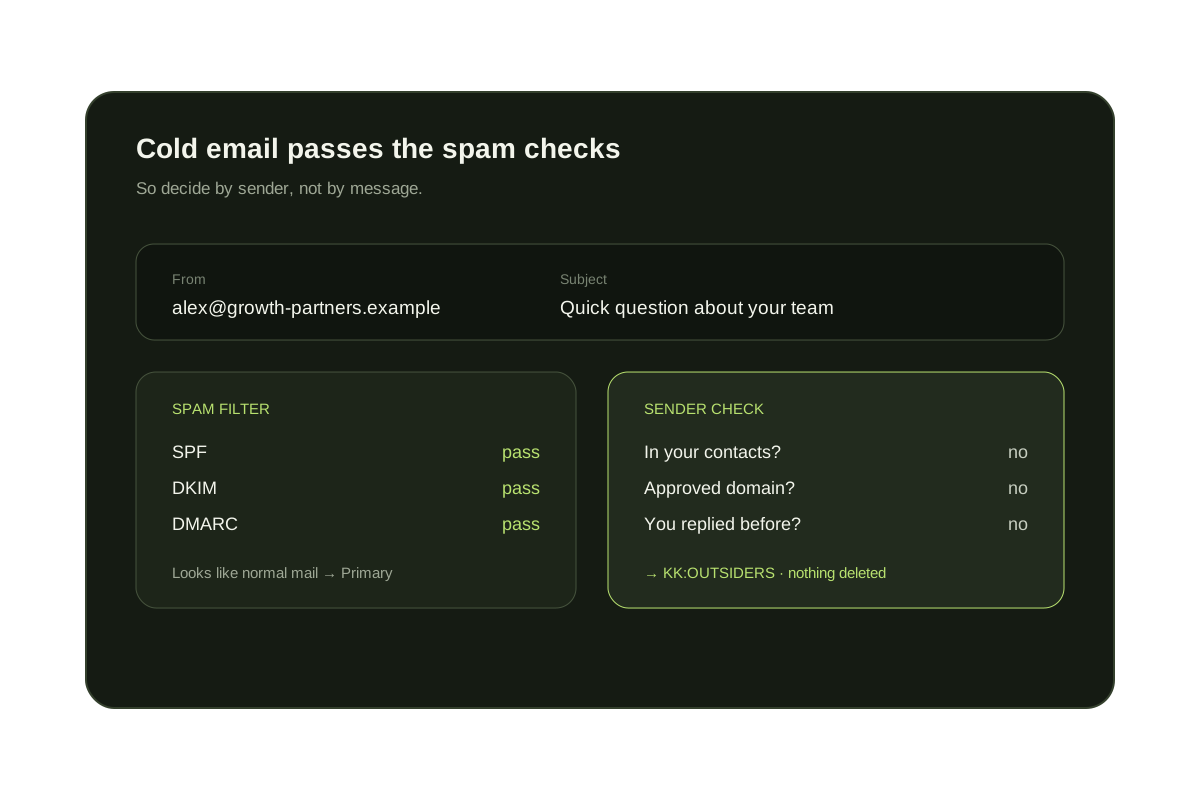
If you write, edit or run a publication, your address is on press lists. A pitch can also be a real tip, so the goal is to change when you see unknown senders, not to delete them. Gmail and Outlook can help a little on their own; the table below shows where they stop.
Short answer
Pitches are a sender problem, and some of them are leads.
Gmail and Outlook can block an address or filter a phrase, but PR agencies rotate senders and tools. Holding mail from people outside your contacts in a review label keeps your inbox for known sources and lets you scan pitches in one sitting, with nothing deleted.
Native options that reduce PR pitches
- Use the unsubscribe link on pitches from an agency or press-release service. Reputable senders include one, and it removes you from that list.
- Block agencies that ignore it: in Gmail choose More then Block, in Outlook use Blocked senders.
- Create a Gmail filter on phrases such as {"embargo" "press release" "for your consideration" "pitch"} with Skip the Inbox and a label named Pitches. Outlook rules can do the same with a folder.
- Publish a dedicated address for pitches on your contact page, and send everything addressed to it into its own label or folder.
- Add your regular sources, PR contacts and publicists you work with as contacts so rules that depend on the sender recognize them.
What each approach handles
| Option | What it handles | Where it falls short |
|---|---|---|
| Unsubscribe link | Lists run by agencies and press-release tools | One-off pitches that include no link |
| Block sender | A single address | Rotating senders at the same agency |
| Phrase filter | Stock phrases like 'press release' | Messages that are worded as personal notes; real releases you want |
| Pitch address | Pitches sent to the public address | Pitches sent to your personal address |
| Contact-based screening (KeepKnown) | Every sender not in your contacts, VIP domains or past replies | A good tip waits until you open the review label |
Where KeepKnown helps, and where it does not
One review queue for pitches
Unknown senders move to KK:OUTSIDERS (Gmail label) or an Outlook category. You read them in one sitting and nothing is deleted.
Approve the sources that matter
Approve a sender or add an organization as a VIP domain and its mail reaches the inbox next time.
Limits to know
Screening cannot tell a good pitch from a bad one, and it does not reply or unsubscribe for you. Tips from new sources are delayed until you check the label.
Decide by sender
Skim pitches when you choose, not when they arrive.
KeepKnown keeps contacts and approved domains in the inbox. Pitches from unknown senders wait in KK:OUTSIDERS, and nothing is deleted.
The audit counts unknown senders without changing your inbox.
Questions before you connect.
How do I stop PR pitch emails?
Use unsubscribe links from agencies, block repeat senders, filter stock phrases into a label and publish a separate pitch address. To stop the whole category, screen senders who are not in your contacts with a tool such as KeepKnown.
Will I miss real story tips?
Not if you use a review label. Mail from unknown senders is held, not deleted, and you can approve a sender at any time.
Why do pitches get past Gmail's spam filter?
They come from real, authenticated domains and look like ordinary mail, so they are not treated as spam.
Can KeepKnown unsubscribe me from agencies?
Screening does not unsubscribe. KeepKnown also has an optional bulk unsubscribe feature that acts only on the senders you select.
Does KeepKnown read my press emails?
No. Screening uses the sender and your contacts, not message bodies. The privacy page explains what is read and stored.
Does it work with Outlook and Microsoft 365?
Yes. KeepKnown supports Outlook.com and Microsoft 365 with a category in place of a Gmail label.
PR pitches
Sources reach the inbox. Pitches wait for review.