Gmail, Outlook and iPhone
How to stop spam emails: what works, and why you get so many.
Four actions work. Mark spam as spam instead of deleting it. Never reply to it or click its links. Filter the domains that keep coming back. Stop handing out your main address, and use a sign-up alias instead. Those cut most junk within weeks. Below are the causes, the steps for Gmail, Outlook and iPhone, and what to do when the spam filter is not enough.
Last updated
Spam never fully stops, but you can cut it a lot, and most fixes take a few minutes. This guide explains why the junk arrives, then gives the steps for Gmail, Outlook and iPhone. It also separates spam from newsletters and cold email, which spam filters treat very differently.
If hundreds of messages arrived within hours, read what to do about email bombing first. If your filters exist and spam still gets through, see why the Gmail spam filter stops working. To block one sender, the Gmail block guide has the steps. Mail from real people you have never met is another problem, covered in how to block cold emails. To check whether your address leaked, use Have I Been Pwned, a free breach checker.
Short answer
Four actions that work, in this order.
First, use Report spam, not Delete, so your provider learns. Second, never reply, and never click Unsubscribe in a message you do not recognize. Third, filter any domain that keeps returning. Fourth, keep your main address private and give an alias to shops and forms. Do these and most spam fades. What remains is mail a filter cannot judge.
Why you're suddenly getting so much spam
Your address was in a data breach
When a website you use is hacked, its list of addresses is copied and sold. Spammers then mail everyone on it. Check your address at haveibeenpwned.com. It is free, and it shows which breaches included you.
Data brokers sell your address
Companies collect addresses from sign-ups, apps and public records, then sell the lists. You may never have heard of them. Once on a list, your address spreads from buyer to buyer.
Your address is posted publicly
Spammers run programs that scan websites, forums, social profiles and old posts for anything that looks like an email address. A club page or a forum signature is enough.
Sign-ups and contests
Free downloads, prize draws and discount codes often pass your address to partners. A box ticked quickly years ago can still be feeding a list.
You replied, or clicked Unsubscribe on real spam
A reply or a click tells the sender your address is live. Real newsletters honor Unsubscribe. A scammer treats it as proof, and sends more.
Hundreds of sign-up emails at once
A sudden flood of welcome and confirmation messages is email bombing. It has a different first step, and the guide at https://keepknown.com/email-bombing/ covers it.
Stop spam in Gmail
- Report spam, do not just delete. Select the message, then the Report spam button in the toolbar, the one with the stop-sign icon. Gmail moves it to Spam and learns from it. Use this for scams and mail you never asked for.
- Block a persistent sender. Open the message, select the three-dot More menu, then Block. Future mail from that address goes to Spam. Blocking helps with one address and little else, because spammers switch addresses.
- Unsubscribe only from senders you know. For a store or newsletter you once joined, the Unsubscribe link is right. For a message you do not recognize, use Report spam.
- Filter a repeat domain. Open the search options, type the domain in the From box, such as @example.com, and select Create filter. Choose Delete it, or Skip the Inbox and apply a label if you want to check it first.
- Rescue real mail. Open the Spam folder now and then, and select Not spam on anything that belongs in your inbox. Gmail gets better as you mark mail both ways.
- Do not empty Spam by hand every day. Gmail clears that folder after about 30 days, and your Report spam clicks do the teaching, not the deleting.
Stop spam in Outlook
- Select the message, then Junk, then Block sender. Outlook moves it to Junk and adds the address to your blocked senders.
- Open Settings, then Mail, then Junk email. Review the Safe senders and domains list and the Blocked senders list. Remove anything you added by mistake.
- Use Sweep to clean up one sender in bulk. It can move all messages from that sender to a folder, or delete them as new ones arrive.
- For scams, use the Report option and choose phishing or junk. That sends a sample to Microsoft so its filters learn.
- Menu names differ between Outlook on the web, new Outlook and the desktop app. Look for Junk, Sweep and Rules in each.
Stop spam on iPhone and in Apple Mail
- In the Mail app, open the message and use the Move to Junk option from the folder or flag menu. Mail files it in Junk and learns from it.
- To block a sender, open the message, tap the sender's name at the top, then choose Block this Contact.
- Review blocked senders in Settings, under Mail. You can add or remove addresses there. Names differ slightly between iOS versions.
- If you read Gmail in the Gmail app on iPhone, follow the Gmail steps above. The Block option sits in the three-dot menu in a message.
Spam, cold email or a newsletter?
| Type | Who sends it | What to do |
|---|---|---|
| Spam | Automated senders, often forged, who never met you. | Report spam. Do not reply or click. Filters catch most of it. |
| Cold email | A real person or sales team who found you and wrote on purpose. | Spam filters usually let it through. Block, filter or screen it. |
| Newsletter | A company or writer you, or someone, signed you up to. | Use Unsubscribe if you know the sender. Filter it if it will not stop. |
Why spam filters miss cold email
A real person wrote it
A salesperson typing to you does not look like a bot. The message is grammatical, personal and sent from a normal address, so a spam filter has no clear sign to act on.
It passes the technical checks
Cold email often comes from properly set-up domains. It is unwanted but not forged. Filters built for forged and malicious mail let it by.
Block it by sender, not by content
The fix is to decide who may reach your inbox. The guide at https://keepknown.com/block-cold-emails-gmail/ shows the rules that work.
Protect your address so spam stops coming back
- Use a plus alias for sign-ups. In Gmail, give a shop yourname+shop@gmail.com and the mail still reaches you. If that alias starts getting spam, you know who sold it, and you can filter it.
- Keep a separate address for public use. Use one for shops, contests and forums, and keep your main address for people. Apple's Hide My Email, part of iCloud+, offers the same idea.
- Never reply to spam, never click links in it, and never open attachments. Even an angry reply confirms your address is live.
- Check whether your address was in a breach at haveibeenpwned.com. If it was, change the password on that site and anywhere you reused it. Turn on 2-step verification.
- Do not post your address as plain text on public pages. Use a contact form, or write it out as name at example dot com.
- Untick marketing boxes when you sign up. Read the checkbox before you press the button.
Gmail spam filter not working?
A filter or contact overrides it
A filter with Never send it to Spam, or a sender in your contacts, tells Gmail to trust them. Check Settings, then Filters and Blocked Addresses, for rules you forgot.
You allowed a whole domain
If you trusted a domain, everything from it passes, including a forged copy. Remove broad rules and keep single addresses.
You never mark mail either way
Gmail learns from Report spam and Not spam. If you only ignore junk, it learns little from you.
It is cold email or a list, not spam
A real sender writing real mail may stay in the inbox because Gmail judges it legitimate. Use a block, a filter or screening.
Another app reads your mail first
If you forward mail or read it in a third-party app, that app's rules may apply before Gmail's. Check its settings.
Follow the full checklist
The article at https://keepknown.com/articles/gmail-spam-filter-not-working/ walks through each check in order.
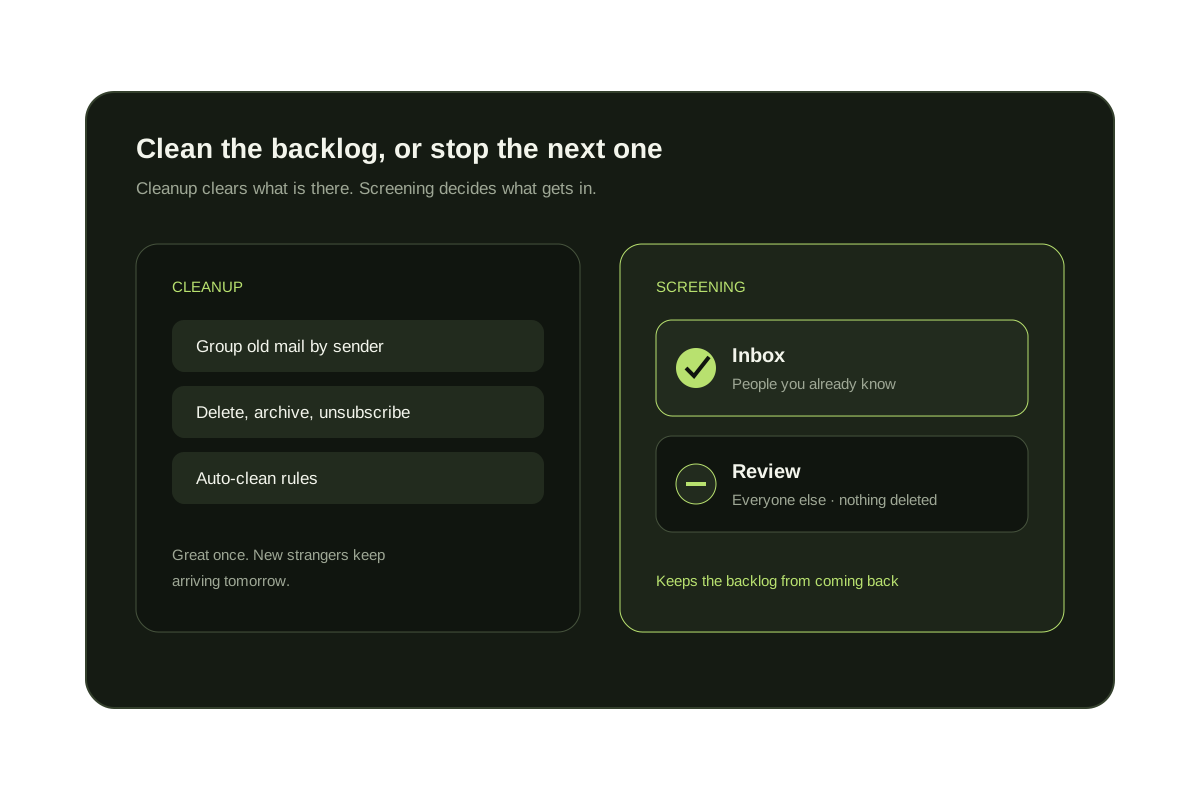
When the spam filter isn't enough: screen by sender
Know who is allowed in
KeepKnown screens Gmail and Outlook by sender. Mail from your contacts and VIP domains stays in the inbox.
Strangers wait in a label
Senders you have never dealt with move to the KK:OUTSIDERS label. Nothing is deleted, and one step rescues a sender.
No message bodies read
KeepKnown reads headers and contacts, not message bodies. You set plain-English rules and preview them first.
Free, and it changes nothing
See how much of your inbox comes from strangers.
The Gmail audit counts senders who are not in your contacts and changes nothing in your inbox. KeepKnown has a 7-day free trial with no card. Want the native route first? Start with the Gmail block guide.
The audit changes nothing. No mail is moved or deleted.
Questions before you connect.
Why am I suddenly getting so many spam emails?
The usual causes are a data breach that included your address, a list sold by a data broker, or a recent sign-up. A sudden flood of sign-up confirmations is email bombing, which needs different steps. Check your address at haveibeenpwned.com.
Does clicking Unsubscribe on spam make it worse?
It can. Real companies honor Unsubscribe, so use it for mail you signed up for. Spammers treat a click as proof your address works. For mail you do not recognize, use Report spam.
Can I stop spam completely?
Not while your address is public or leaked. You can cut it a lot with reporting, filters and an alias. Screening by sender stops mail from anyone you have not dealt with.
Should I delete the spam or report it?
Report it. Reporting teaches Gmail and Outlook what you consider junk. Deleting only removes that one message. After you report it, the provider clears it from Spam on its own.
Do I need a new email address?
Rarely. A new address breaks logins and password resets. Filter, report and use aliases first. Switch only if the address is so widely leaked that nothing helps, and keep the old one for a while.
Spam still getting through?
See how many strangers reach your inbox. The audit is free.